
Tutorials
A Guide to Laser Engraving Slate Coasters
Oct
Estimated reading time: 8 minutes
Key Takeaways
- Choose the Right Material: Always opt for natural, untreated, and smooth slate. Coated slate can cause inconsistent engravings, residue, and harmful fumes.
- Test Your Settings: Before every project, run a material test grid on a spare coaster to find the perfect combination of power and speed for a bright, high-contrast mark.
- High Speed, Low Power: The goal is to ablate or “bruise” the slate’s surface, not carve it deeply. Use high speeds and relatively low power to prevent overheating, which can cause a melted or yellowish appearance.
- Finish with Mineral Oil: After cleaning off the engraving dust, apply food-safe mineral oil. This darkens the un-engraved slate while leaving the engraved areas light, dramatically enhancing the design’s contrast and “pop.”
Table of Contents
- Selecting the Ideal Slate for Engraving
- Mastering Your Laser Engraving Settings for Slate
- Post-Engraving Cleaning and Finishing Techniques
- Conclusions
- Frequently Asked Questions
Laser engraving on slate coasters offers a fantastic way to create durable, high-contrast, and elegant custom pieces. Whether for personalized gifts, promotional items, or home decor, slate provides a unique canvas. This article will guide you through the entire process, ensuring you have the knowledge to achieve professional-quality results on every project.
Selecting the Ideal Slate for Engraving
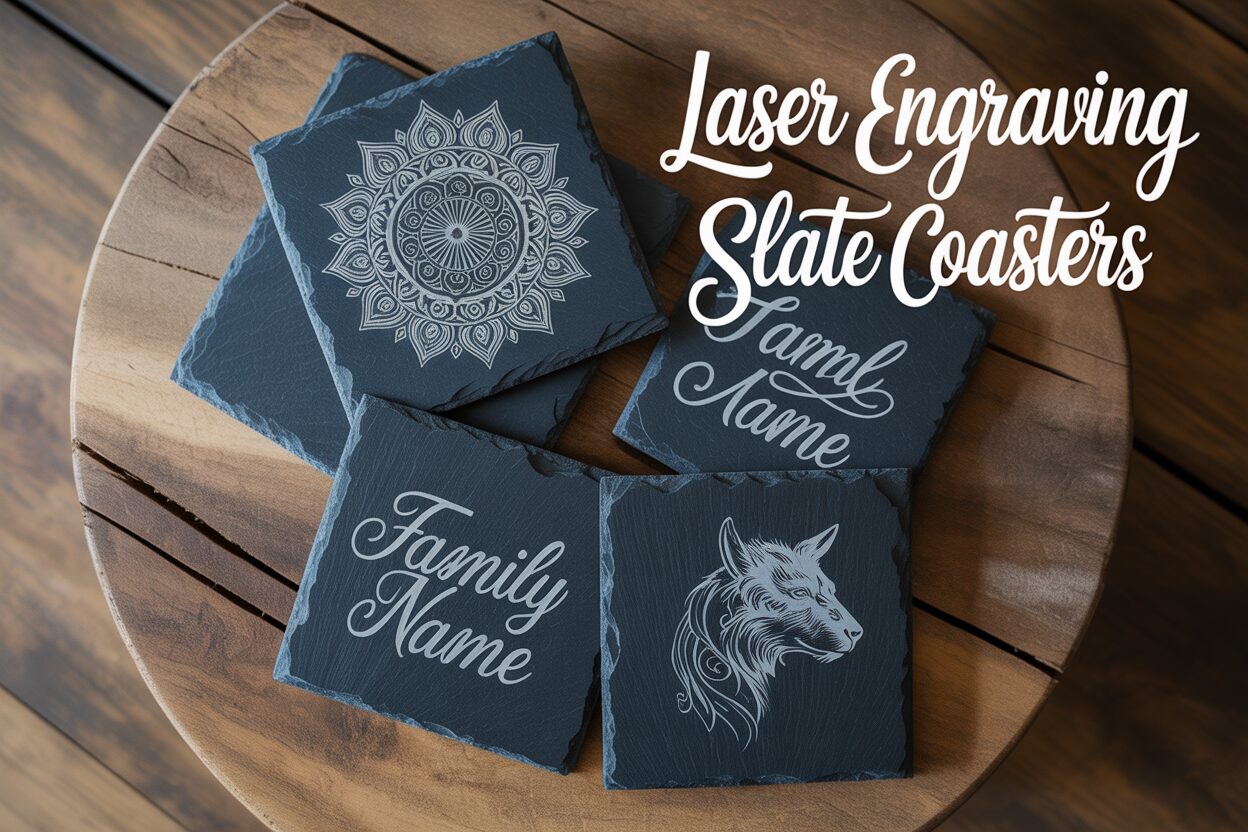
The foundation of a stunning laser-engraved coaster is the slate itself. While it may seem like a simple piece of rock, not all slate is created equal, and your choice will directly impact the quality, contrast, and consistency of your final product. The best choice for laser engraving is natural, untreated slate. This type of slate allows the laser to interact directly with the stone’s mineral composition. When a diode or CO2 laser beam hits the dark gray or black slate, it ablates the surface and alters the material, creating a permanent, light gray or whitish mark. This process yields a beautiful, natural contrast that is both sharp and durable without the need for any color filling.
In contrast, you will often find slate products, especially those intended for food service, that are coated or treated with sealants, oils, or lacquers. While these coatings can enhance the slate’s color and make it non-porous, they create a barrier for the laser. The laser must first burn through this protective layer before it can mark the stone underneath. This can lead to several problems: inconsistent engraving depth, a sticky or gummy residue on the coaster and your laser lens, and potentially unpleasant or harmful fumes from the vaporized sealant. The final engraving may appear less crisp and can sometimes have a yellowish or burnt tinge. If you must use coated slate, you should consider sanding or using a solvent to remove the coating first, which adds significant time and effort to your workflow. For the cleanest and most predictable results, always opt for raw, uncoated slate.
Surface, Color, and Thickness: A Trifecta for Quality
Beyond the type of slate, its physical characteristics are crucial. The single most important factor for achieving a clean engraving is a smooth, uniform surface. Slate naturally has a layered structure, and lower-quality pieces can be “riven,” meaning they have a rough, flaky, or uneven texture. This unevenness is a major obstacle for a laser. Your laser engraver operates with a precise focal point where the beam’s energy is most concentrated. If the surface of the slate has hills and valleys, parts of your design will be in focus while other parts will be out of focus. In-focus areas will be sharp and bright, while out-of-focus areas will appear blurry, weak, or wider than intended. Look for coasters with a honed or very lightly textured surface that is consistent across the entire piece. A flat coaster that doesn’t wobble on a level surface is also essential for maintaining focus.
When sourcing your slate coasters, whether from online craft suppliers, big-box stores, or even tile shops, keep an eye on the following details:
- Color: Aim for a consistent, deep charcoal gray or black slate. The darker the base material, the higher the contrast your light gray engraving will have. Avoid slates with significant color variations or large, rust-colored mineral deposits, as these areas will react differently to the laser and can disrupt the uniformity of your design.
- Thickness: A thickness of 4mm to 6mm is generally ideal. This provides a satisfying weight and durability. Most importantly, try to source coasters that have a consistent thickness across the batch. This saves you the tedious task of having to refocus your laser for every single coaster in a multi-item project.
- Edges: The edges can be saw-cut for a clean, modern look or hand-chipped for a more rustic feel. Both styles engrave beautifully, but inspect chipped edges for any large, unstable flakes that could break off. Consistency is key to a professional-looking set.
Taking a few extra moments to inspect your raw materials will save you immense frustration during the engraving process and is the first step toward creating a truly professional-quality product.
Mastering Your Laser Engraving Settings for Slate
Dialing in the correct laser settings is where the magic happens, transforming a plain coaster into a high-contrast piece of art. The three primary variables you will control are power, speed, and focus. For slate, your goal is not to cut deeply into the material, but rather to ablate the surface just enough to change its color to a light gray or white. Think of it as bruising the stone rather than carving it. Achieving the perfect balance between power and speed is critical. Too much power or too slow a speed will overheat the slate, resulting in a melted, glassy appearance or a less vibrant, yellowish mark. Too little power or too fast a speed will produce a faint, inconsistent engraving that lacks contrast.
Finding your machine’s sweet spot requires testing, as every laser and every batch of slate is slightly different. However, there are excellent starting points for both common types of lasers.
- Diode Lasers (5W-20W): Diode lasers excel at engraving slate. Their wavelength is well-absorbed by the material, producing brilliant results. A good starting point for a 10W diode laser is a speed of 3000 mm/min at 80-90% power. For a 20W diode, you can increase the speed to 4000-6000 mm/min at 70-80% power. The key is to move quickly enough to prevent overheating the stone.
- CO2 Lasers (40W+): CO2 lasers are significantly more powerful and can work much faster. A typical starting point for a 40-60W machine would be a speed of 300 mm/s at 12-18% power. Notice the use of low power; using high power on a CO2 laser will instantly overheat and potentially crack the slate. You are leveraging the laser’s speed, not its raw power.
The Non-Negotiable Step: The Material Test Grid
Before you engrave your final design, you must run a material test grid on a spare coaster from the same batch. Most laser software (like LightBurn or XCS) has a built-in function for this. This test creates a grid of small squares, each engraved with a different combination of power and speed. Once the test is complete, examine the squares closely. You are looking for the square that produced the brightest, most consistent white or light gray color. Reject squares that look dark, melted, or yellowish—these are “over-burned.” Also, reject squares that are faint or patchy. The settings from the winning square become your starting point for the project.
Focus is equally important. Use your laser’s standard method to set the correct focal height. An out-of-focus beam will be wider and less powerful, resulting in a blurry, weak mark. Interestingly, some advanced users intentionally defocus their laser very slightly (1-2mm) to widen the beam just enough to create a smoother, whiter appearance rather than a sharp, etched line. This is an advanced technique worth experimenting with, but only after you have mastered achieving a perfect mark with standard focus. By methodically testing power, speed, and focus, you remove the guesswork and ensure every coaster you produce is engraved with crisp, vibrant, and professional-quality results.
Post-Engraving Cleaning and Finishing Techniques
Once the laser has finished its work, your coaster will be covered in a fine layer of gray dust—the remnants of the ablated slate. The first step is to gently remove this loose residue. A soft-bristled brush, like a paintbrush or a clean makeup brush, works perfectly for this. Alternatively, a quick puff of compressed air can blow away the majority of the dust. Avoid wiping it with your hand, as the oils from your skin can smudge the fine dust into the slate’s pores. After the initial dusting, take a clean, lint-free microfiber cloth, dampen it slightly with water, and wipe down the entire surface. This will pick up any remaining microscopic dust particles, leaving you with a clean but somewhat muted engraving. At this stage, the design will be clear, but it won’t yet have the dramatic, high-contrast pop that makes engraved slate so visually striking.
Enhancing Contrast with Mineral Oil and Sealants
To truly make your design leap off the coaster, the secret lies in applying food-safe mineral oil. This is the single most effective technique for finishing slate. Pour a small amount of mineral oil onto a clean cloth and rub it evenly across the entire surface of the coaster. You will immediately see a remarkable transformation. The oil is absorbed by the porous, un-engraved areas of the dark slate, deepening its color to a rich, dark gray or near-black. However, the laser-engraved portions, which have been altered by the heat, are no longer porous and will not absorb the oil. They remain their light gray or white color. This differential absorption creates a stunning visual contrast that makes the engraving appear brighter and sharper. After applying the oil, let it soak in for a few minutes, then take a separate clean, dry cloth and buff off any excess. This process not only enhances the look but also helps to condition and protect the slate.
While mineral oil is the most common and often preferred method, you can also use other sealants for a different effect or level of protection.
- Clear Food-Safe Sealants: Products like spray-on shellac or brush-on polyurethane designed for food contact surfaces can provide a permanent, waterproof seal. This is a good option if the coasters will be exposed to significant moisture. A matte or satin finish will preserve a more natural look, while a gloss finish will give the coaster a shiny, wet appearance. The downside is that sealants can sometimes slightly yellow over time and permanently alter the natural texture of the stone.
- Color-Enhancing Sealers: Stone sealers used for countertops can also be used. These often darken the stone similar to mineral oil but provide a more durable, semi-permanent finish. Always ensure any product you use is non-toxic and food-safe once cured.
The finishing technique you choose can complement your design. An intricate Celtic knot or a rustic family crest often looks best with a simple mineral oil finish that preserves the slate’s natural charm. In contrast, a modern, minimalist logo or a detailed photograph might benefit from the smooth, uniform surface provided by a matte sealant, giving it a more polished, commercial feel. For quotes or personalized text, the high contrast from mineral oil ensures maximum readability and impact.
Conclusions
You now possess the essential knowledge to masterfully create stunning laser-engraved slate coasters. By carefully selecting your slate, dialing in the correct laser settings, and applying the proper cleaning techniques, you can produce consistently beautiful results. Experiment with different designs and settings to develop your unique style and elevate your craft to the next level.
Frequently Asked Questions
Q: What’s the best type of slate to use for laser engraving?
A: The best choice is natural, untreated slate with a smooth, uniform surface. Avoid slate that has been coated or sealed with oils or lacquers, as the laser has to burn through the coating, which can lead to inconsistent results, a sticky residue, and potentially harmful fumes.
Q: What are good starting laser settings for a 10W diode laser on slate?
A: A great starting point for a 10W diode laser is a speed of 3000 mm/min at 80-90% power. For slate, you want to use high speed to prevent overheating the stone, which can result in a less vibrant, yellowish mark.
Q: How do I make the engraving “pop” after it’s finished?
A: The most effective method is to apply food-safe mineral oil. After you’ve cleaned the dust from the coaster, wipe it down with mineral oil. The oil will darken the un-engraved slate to a rich black or dark gray, while the engraved portion remains light, creating a brilliant, high-contrast effect.
Q: Why is my slate engraving blurry or weak?
A: This is most commonly caused by an incorrect focal height. Ensure your laser is perfectly focused on the slate’s surface. This issue can also be caused by using poor-quality slate that has an uneven or “riven” surface, as this means parts of your design will be in focus while others are out of focus.
Block "subscribe-popup" not found
